Samsung’s Galaxy A57 Integrates AI Workflows Across Search, Photography, and Multitasking
Samsung built the Galaxy A57 around photography, editing, and mobile productivity

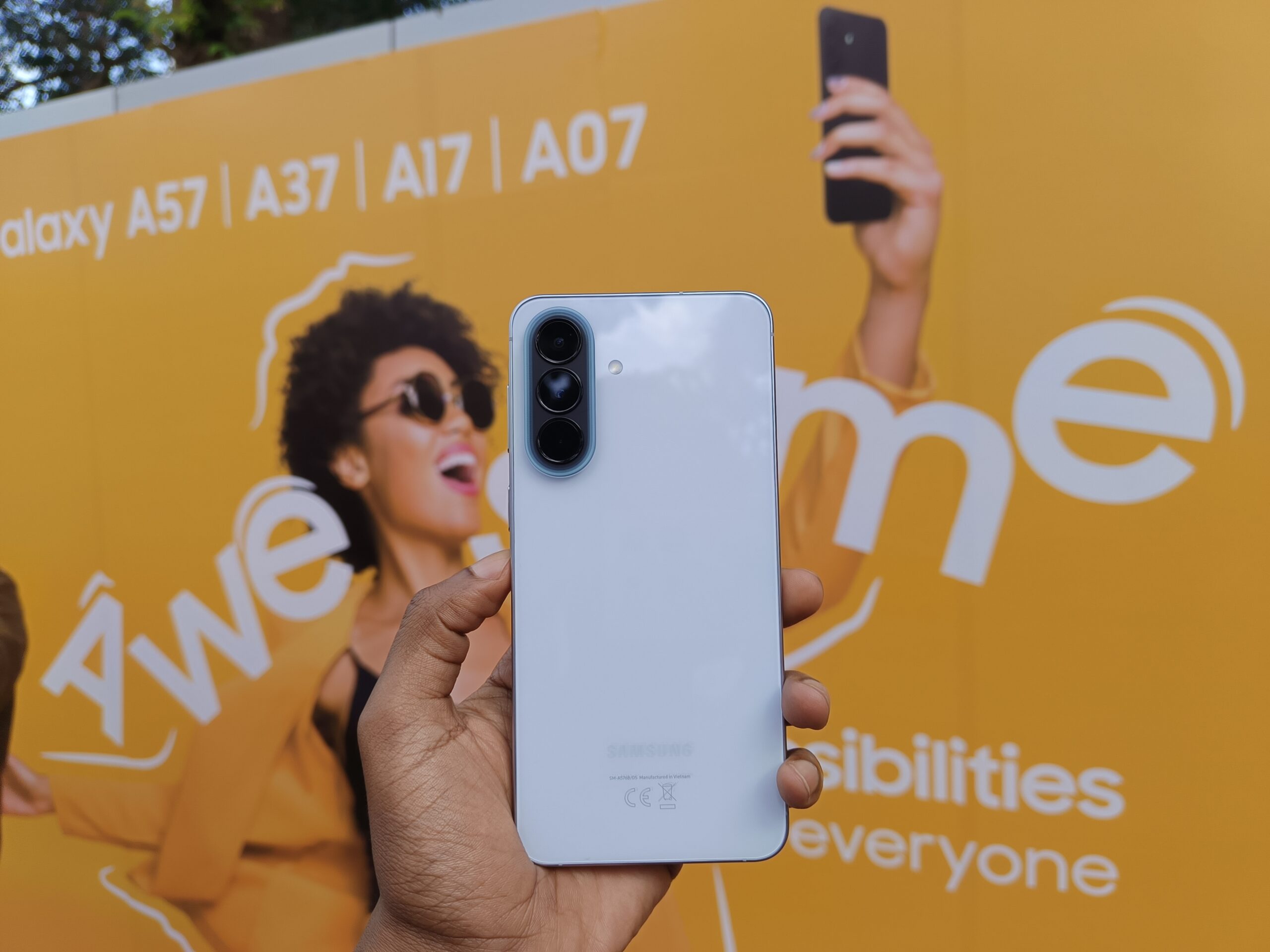
Samsung Galaxy A57 was launched in the country early this month alongside the Galaxy A37 as the new entrants for this year’s A series.
It is a pretty significant moment for the A series, especially the A57, which got announced at a time when AI features are now becoming baseline expectations not only across flagship devices but also midrange smartphones as well. Samsung has been steadily moving AI-assisted workflows , contextual search tool, camera intelligence, and software automation from its premium devices to the more popular A series as we had seen with last year’s Galaxy A56.
In recent years, consumers are starting to now expect that their smartphones should be able to anticipate tasks, simplify interactions, and improve content creation without the need for specialist apps or technical setup.
The A57 delivers in that direction very clearly. The smartphone has combined AI assistant integration,contextual visual search, computational photography features, workflow automation, multitasking systems, together with creator-focused utilities al in a package designed around pricatical daily use.


Samsung’s broader strategy around the device also appears increasingly tied to creator culture and social-first smartphone behavior. During hands-on sessions in Nairobi, the company framed the A-series less around specifications alone and more around how people actually use their phones throughout the day for photography, editing, business management, communication, and short-form content production.
That positioning mirrors a larger shift inside the smartphone industry. Companies are increasingly competing around software longevity, ecosystem integration, AI assistance, creator tooling, and ownership value rather than raw hardware specifications alone.
One of the most visible changes on the Galaxy A57 is Samsung’s expanding assistant ecosystem. The device supports Google Gemini directly through the side button while also integrating Perplexity Assistant, which Samsung says has been optimized specifically for Galaxy devices.
Perplexity can operate alongside Bixby and interact with phone functions directly after voice activation is configured. Samsung is effectively repositioning the smartphone assistant model away from a single default AI layer toward a broader assistant environment where users can choose between Gemini, Perplexity, ChatGPT, Claude, and Bixby depending on context and workflow.
That strategy mirrors a wider industry transition where AI is increasingly being embedded into search, navigation, productivity, photography, and personalization systems rather than existing as a standalone chatbot feature.
The A57’s software experience leans heavily into that philosophy.
Samsung highlights AI-assisted image editing workflows through Gemini integration. By long-pressing the side button, I launched Gemini, uploaded photos directly from the gallery, and typed editing prompts conversationally into the assistant.
In one workflow, I transformed a daytime street photo into a nighttime scene entirely through text instructions. In another, I removed distracting elements from the background and generated new visual details inside the frame without opening separate editing software.
The Galaxy A57 also expands Samsung’s AI-driven visual interaction tools through Circle to Search integration.
Users can activate the feature by opening Settings, navigating to Display, selecting Navigation Bar, and enabling Circle to Search. The activation method changes depending on navigation style. For button navigation, users press and hold the center button. For gesture navigation, users press and hold the gesture bar at the bottom of the display.
Once activated, users can circle, highlight, or draw around any object visible on-screen to trigger contextual visual search results.
I circled multiple visible objects simultaneously and received layered search results for several items within the same image. I also highlighted products directly from social media feeds and retrieved visually similar items without manually typing search terms.
Samsung positions the feature as a friction-reduction layer for discovery and interaction. Users can identify products, search visually similar objects, retrieve contextual information, and move between inspiration and search results without manually typing queries.
The workflow increasingly positions the smartphone display itself as a discovery surface. The feature aligns naturally with visual shopping behavior, fashion inspiration, thrift-style item discovery, and creator research workflows where users move directly from curiosity to contextual search through visual prompts rather than text-based navigation.
I also copied text from surfaces where text selection would normally be impossible, translated highlighted text instantly into another language, searched songs through humming or background audio, and initiated voice-based contextual searches directly from the interface.
Samsung additionally routes some results into AI-powered browser summaries, extending the search process beyond conventional web lookup into more conversational information retrieval.
The company is also extending AI-assisted interaction deeper into multitasking and editing workflows.
Samsung’s AI Select system integrated into the Edge Panel allows users to isolate portions of the screen, generate selective screenshots, and trigger contextual actions directly from highlighted content. By swiping open the Edge Panel and selecting AI Select, I isolated portions of on-screen content and immediately saved or shared extracted sections without taking full screenshots.
The workflow increasingly treats the display itself as an editable workspace instead of a static viewing surface.
Samsung also adds drag-and-drop multitasking functionality across floating windows and split-screen layouts. I opened applications through the Edge Panel, dragged apps into split-screen mode, and moved images, text, and files between windows without repeated copy-and-paste actions.
The A57’s creator-oriented software layer also leans heavily into AI-assisted editing efficiency.
Samsung’s Object Eraser tools remove unwanted people or background distractions directly on-device. After opening a photo inside the Gallery app and selecting the AI editing tools, I highlighted unwanted background objects and allowed the phone to regenerate surrounding image details automatically.
The Galaxy A57 additionally introduces AI-powered editing workflows such as Best Face and Auto Trim.
Best Face improves group shots by selecting stronger facial expressions from multiple captured frames. I swapped facial expressions in group photos to correct moments where someone blinked or looked away during the original capture.
Auto Trim automates portions of the video editing workflow by identifying key moments and generating shortened clips designed for faster social-media publishing. I used the feature to generate shorter social-ready clips directly from longer recordings without manually trimming footage frame by frame.
These tools reinforce Samsung’s broader positioning around practical AI utility rather than experimental demonstrations. The company is increasingly framing AI as background assistance integrated directly into ordinary smartphone behavior.
The camera experience itself continues that direction.
The Galaxy A57 ships with a standard 12-megapixel shooting mode but includes a 50-megapixel high-resolution option designed for capturing finer detail in well-lit conditions. Samsung also expanded camera controls through its downloadable Camera Assistant module, which unlocks additional image-processing settings.
There’s pretty visibled improved image processing and low-light performance through Samsung’s updated imaging pipeline. The upgraded ISP system is designed to improve clarity, detail retention, and scene stability during difficult lighting conditions often associated with nightlife photography, indoor events, and creator shooting environments.
During creator workshops in Nairobi, I tested low-light shooting techniques, real-time image optimization, and mobile street-photography workflows centered entirely on the A-series devices.
One of the more practical additions allows users to prioritize focus over shutter speed to reduce blurry photos. The feature directly targets a common smartphone camera problem where motion or poor focus timing can soften otherwise usable shots.
Users can activate the setting through the Camera Assistant module by opening the Camera app, navigating into Camera Assistant settings, and enabling focus priority controls.
Samsung further adds composition guides, leveling indicators, and framing tools intended to help users capture straighter and more stable images. Grid overlays based on the rule of thirds and spirit-level alignment markers are integrated directly into the camera interface.
Several of these tools are deeply embedded into the shooting workflow itself. Users can instantly launch the camera from anywhere in the operating system by double-pressing the side button. Samsung also allows that shortcut to be customized so the same double press can immediately open portrait mode, launch selfie mode, or begin video recording.
The broader camera strategy increasingly centers on helping users capture crisp, stable moments with less manual intervention.
Features like Dual Record continue that push by allowing creators to capture picture-in-picture footage using multiple camera perspectives simultaneously. I recorded rear-camera footage while capturing front-facing reactions at the same time for vlog-style creator content.
The device also includes advanced screen-recording utilities with floating selfie overlays, annotation tools, touch indicators, and resizable creator windows aimed at tutorials and short-form content workflows.
Samsung’s creator-focused workflow system is increasingly built around immediacy. I opened the screen recorder from the quick settings panel, selected partial-screen recording, enabled microphone audio, and overlaid a floating selfie camera during recording sessions.
The A57’s software layer also places strong emphasis on efficiency and multitasking.
Samsung’s RAM Plus system allows users to expand virtual memory allocation to improve multitasking and background app retention. Device Care tools monitor memory usage, while auto-optimization settings can restart the device automatically when excessive background processes begin affecting performance.
Battery optimization also plays a larger role throughout the experience. Samsung says the software adapts battery behavior dynamically depending on usage patterns tied to photography, video editing, streaming, or extended creator sessions away from charging points.
The Edge Panel system extends that efficiency philosophy further. Users can swipe open the panel to launch floating apps, create split-screen workspaces, save multitasking layouts, and move applications into pop-up windows layered over the main interface.
I held down app icons from the Edge Panel and dragged them to the top or bottom of the display to instantly create split-screen layouts before selecting a secondary app to complete the workspace.
Samsung also includes a Secure Folder environment that creates a separate encrypted workspace within the device. I accessed the feature through the quick settings panel, authenticated with a fingerprint, and created a secondary environment for cloned apps, isolated galleries, separate accounts, and protected files.
Several workflow improvements focus on reducing friction during everyday interactions. Keyboard gestures allow swipe-based shortcuts for copy, paste, and undo actions, while side-button remapping enables faster access to wallets, assistants, cameras, and frequently used applications.
The phone also incorporates one-handed interface scaling, lift-to-wake gestures, double-tap controls, palm-swipe screenshots, and customizable quick settings panels intended to streamline navigation throughout the operating system.
By navigating to Advanced Features and opening Motions and Gestures, I enabled lift-to-wake controls, gesture-based muting, and palm-swipe screenshot capture directly from the settings menu.
Customization remains another major focus of the A57 experience.
I personalized the lock screen by pressing and holding the display while unlocked, then adjusted clock styles, widgets, shortcuts, colors, and layout styles directly from the customization panel.
Samsung also allows users to configure the always-on display through the Lock Screen and AOD settings menu, including an option for a permanently active always-on mode.
The Edge Panel itself can also be heavily customized. I added task shortcuts, clipboard tools, reminders, and app collections while adjusting the panel handle’s transparency, placement, and orientation.
Automation remains central to Samsung’s software approach. Through Modes and Routines, users can configure the device to adjust media volume automatically, trigger spoken low-battery notifications, generate custom charging alerts, and respond dynamically to usage patterns throughout the day.
I configured automatic media-volume reductions when opening entertainment apps alongside spoken battery alerts and charging notifications triggered at preset battery percentages.
Notification management receives similar customization. The A57 supports edge-lighting effects, color-coded flash notifications, notification history tracking, and persistent always-on display tools designed to surface information with minimal interaction.
Samsung’s Good Lock ecosystem continues to serve as the company’s deeper personalization layer. Users can customize unlock animations, fingerprint effects, quick settings layouts, gestures, and interface behaviors without replacing the default launcher experience.
Samsung is also reinforcing the Galaxy A57 around longer ownership cycles. The company confirmed up to six years of Android OS and security updates for the device while pairing the phone with installment-financing programs and Samsung Care Plus support options in Kenya.
Pricing for the Galaxy A57 5G starts at Ksh 60,900 for the 8GB/128GB variant and rises to Ksh 66,700 for the 8GB/256GB model. Samsung is additionally positioning the devices alongside the LOOP FLEX financing platform, allowing buyers to make a minimum 10 percent deposit before repaying the remaining balance through installments spread across three to twelve months.
That financing structure reflects a broader shift in Kenya’s smartphone market, where devices increasingly sit above immediate disposable spending power and ownership cycles continue stretching longer.
Samsung is also extending Samsung Care Plus deeper into the A-series lineup. The support structure includes device protection options tied to theft, accidental liquid damage, mechanical breakdown coverage, and a one-year screen replacement program where users only cover servicing labor costs.
The Galaxy A57 5G is now available through Samsung stores and retail partners across Kenya.
That broader ownership framing increasingly matters in a market where smartphones are becoming longer-term purchases tied to financing, repair support, software longevity, and ecosystem retention rather than rapid annual replacement cycles.
Taken together, the Galaxy A57 demonstrates how smartphone competition is increasingly shifting toward software intelligence, contextual visual discovery, creator workflows, and friction reduction.
Features once reserved for flagship devices are steadily moving into mid-range phones where AI-assisted photography, conversational editing, contextual search, multitasking systems, and embedded automation are becoming part of the expected smartphone experience.
Samsung’s strategy with the A57 appears focused on making those capabilities persistent and immediately accessible throughout ordinary phone use. The objective is no longer simply adding AI features to smartphones. The objective is integrating those systems into the routines users already have and reducing the amount of effort required to move between tasks, content creation, communication, and discovery.
Go to TECHTRENDSKE.co.ke for more tech and business news from the African continent and across the world.
Follow us on WhatsApp, Telegram, Twitter, and Facebook, or subscribe to our weekly newsletter to ensure you don’t miss out on any future updates. Send tips to editorial@techtrendsmedia.co.ke