
More ways to pay, fewer checkout hurdles: What LOOP Biz PDQ brings to Kenyan businesses

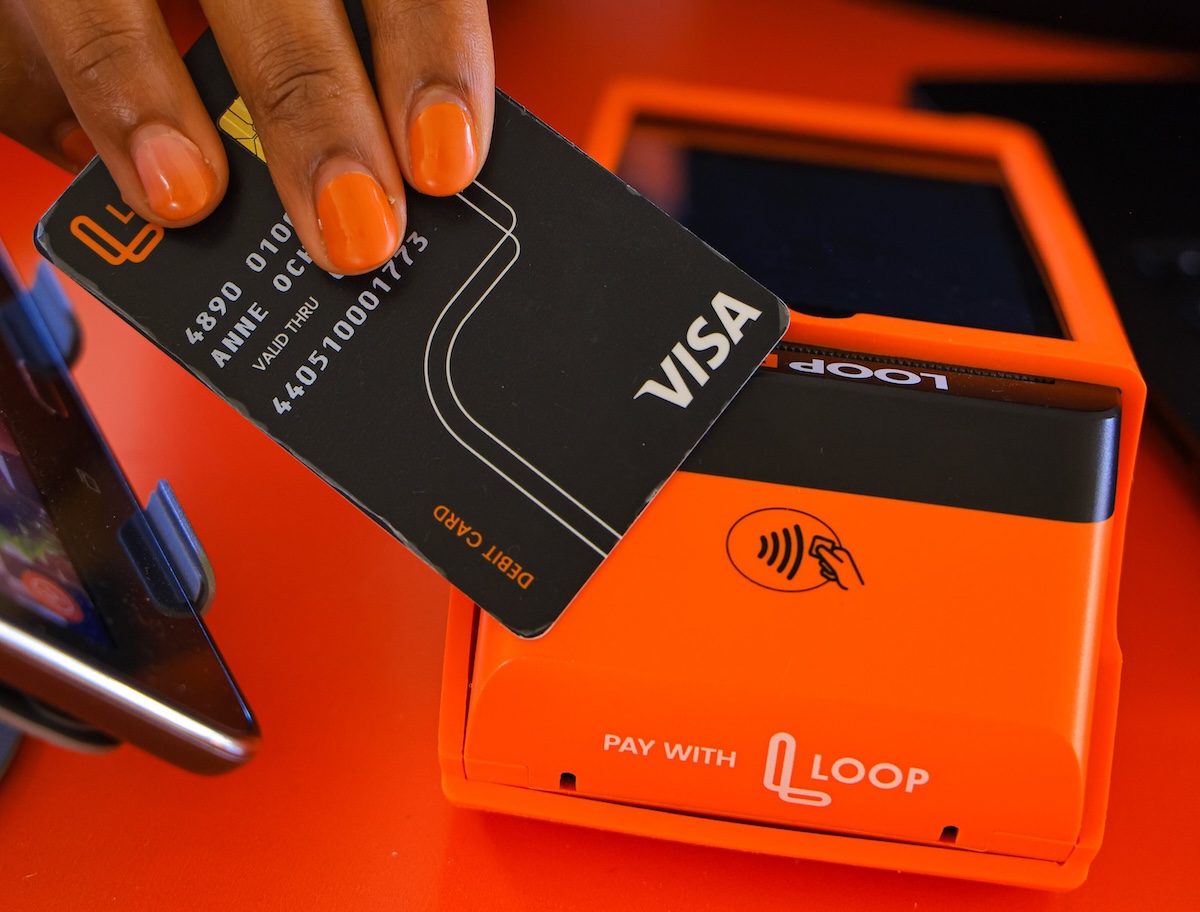
A customer reaches a shop counter, confirms what they want to buy and prepares to pay. Some prefer using a debit or credit card, others choose M-PESA, while LOOP users have another option. For merchants serving customers with different payment preferences, having a straightforward way to accept these transactions can make the checkout process easier to manage.
LOOP BIZ+ POS extends the payment capabilities available to merchants using LOOP BIZ+. The terminal supports Visa and Mastercard transactions through chip insertion and contactless payments, M-PESA Till and Paybill payments, as well as M-PESA STK Push. Customers can also pay through LOOP STK Push at no charge.
The device brings these options together at the counter, but its role extends beyond payment acceptance. NCBA is developing LOOP BIZ+ as a broader merchant platform that connects transactions with inventory management, business financing and customer acquisition.
Sheila Kimani, Chief Commercial Officer at LOOP DFS, says the company’s objective is to reduce the fragmentation merchants face when managing their businesses.



Kimani, who has worked with merchants for several years, says the company identified an opportunity to bring services that businesses commonly manage separately into one environment.
One device for different payment preferences
The LOOP BIZ+ POS accepts card payments through chip insertion and contactless NFC technology. Customers with supported cards can insert their cards into the terminal or tap to complete a transaction. Merchants can also receive payments through M-PESA Till and Paybill, or initiate an STK Push request for the customer to approve on their phone.
LOOP users have a separate payment option through LOOP STK Push, which allows them to authorise a payment through the LOOP application. LOOP-to-LOOP payments are free.
Bringing these payment routes together gives businesses one device for customers who prefer different cashless payment methods. A retailer may serve someone paying by card, followed by a customer using M-PESA, while another customer may choose to pay through LOOP. The merchant can handle these transactions through the same terminal.
The terminal is linked to the merchant’s LOOP Till, which is required to operate the device. Merchants can have funds settled into a bank account of their choice through the LOOP Till, giving them flexibility over where they receive their payments.
How STK Push works at the counter
One of the useful features of the LOOP BIZ+ POS is STK Push, which allows a merchant to initiate a payment request from the terminal while the customer approves it on their phone.
The cashier enters the amount due and sends the payment request. The customer receives an STK prompt and authorises the transaction using their PIN.
Because the payment request carries the amount entered by the cashier, customers do not have to manually key in the payment amount or merchant Till number. This reduces the possibility of errors associated with entering payment details at checkout, although the cashier still needs to ensure the requested amount is correct.
The same approach applies to LOOP STK Push. The merchant initiates the request through the terminal, and the customer approves it using the LOOP application.
Keeping track of payments after checkout
Accepting a payment is one part of running a business. Merchants also need to identify transactions, reconcile sales and keep records that can be retrieved when questions arise.
The LOOP BIZ+ POS supports this through transaction histories and downloadable reports. Merchants can generate X reports for interim transaction checks and Z reports for end-of-day reconciliation. Staff can retrieve previous transactions and reprint receipts when customers need another copy or the business needs to review a sale.
The terminal also supports administrator-controlled access for authorised users, helping businesses manage which employees can use the device.
The wider LOOP BIZ+ proposition is intended to address the work that follows a payment. Kimani says merchants often rely on separate records and manual processes to establish how much they have received, what they have paid out and how their businesses are performing.
She says LOOP wants to bring payments from mobile money, bank channels and card transactions into a more comprehensive view of merchant activity. The platform also allows merchants to monitor business information through the application or web interface, including when they are away from their physical stores.
Connecting payment acceptance to inventory management
LOOP BIZ+ also offers inventory management, which connects stock records with sales processed through the LOOP BIZ+ POS.
When inventory management is active, a sale processed through the terminal automatically updates the corresponding stock level. This helps merchants keep inventory records aligned with what has been sold and identify items that need replenishment.
The inventory tool uses AI capabilities to track stock, forecast demand and provide recommendations. It can help identify slow-moving products and give merchants additional information when making purchasing decisions.
Kimani says the inventory system is intended to help businesses understand which products are moving faster and which are taking longer to sell. A merchant preparing to purchase new stock can use those insights to make more informed decisions about what to reorder.
The connection between sales and stock records also contributes to the wider financial information LOOP wants to build around merchants. Kimani says inventory movements, alongside incoming payments and business outflows, can help the company understand how a business operates when assessing it for financing.
LOOP Discover gives merchants another route to customers
Beyond payments and inventory, LOOP is using its consumer platform to create another potential sales channel for merchants.
LOOP Discover provides a storefront within the consumer application where businesses can list products and promote offers. The company has previously stated that the platform has more than 500,000 consumers.
Kimani says merchants can use Discover to promote discounted products and deals to this audience. A retailer, for example, may want to reduce the price of existing phone stock before bringing in a new batch of products.
Instead of relying only on its physical store, website or social media accounts, the merchant can upload the offer to Discover. LOOP’s marketing and commercial teams then help distribute the deals to consumers on the platform.
This gives merchants another avenue for reaching potential buyers, although the actual sales generated will depend on consumer engagement and the performance of individual offers.
What LOOP BIZ+ POS costs and where the platform is heading
The LOOP BIZ+ POS subscription costs KSh1,200 per month, while inventory management costs KSh1,990 per month before tax. LOOP also offers a one-off payment option for the POS device.
The services allow merchants to extend their existing LOOP BIZ+ accounts with additional payment and business management capabilities.
Kimani says LOOP is also working towards introducing e-commerce solutions and additional lending products. The company is considering further development of its POS offering, including SoftPOS, which would allow compatible smartphones to accept contactless card payments without requiring a conventional terminal.
She also identifies additional collateral-based lending products as part of the company’s roadmap, although she does not provide launch dates or detailed eligibility requirements.
For merchants, the immediate LOOP BIZ+ POS proposition centres on accepting different forms of digital payment through one device. The wider LOOP BIZ+ strategy goes further, connecting payment records with inventory, financing and opportunities to reach new customers.
Visit TECHTRENDSKE.co.ke for more tech and business news from across Africa and the world.
Follow us on WhatsApp, Telegram, Twitter, and Facebook, or subscribe to our weekly newsletter so you don’t miss future updates. Send tips to info@techtrendsmedia.co.ke

