
How Hakikisha lets M-PESA customers verify Equity merchant names before confirming a payment

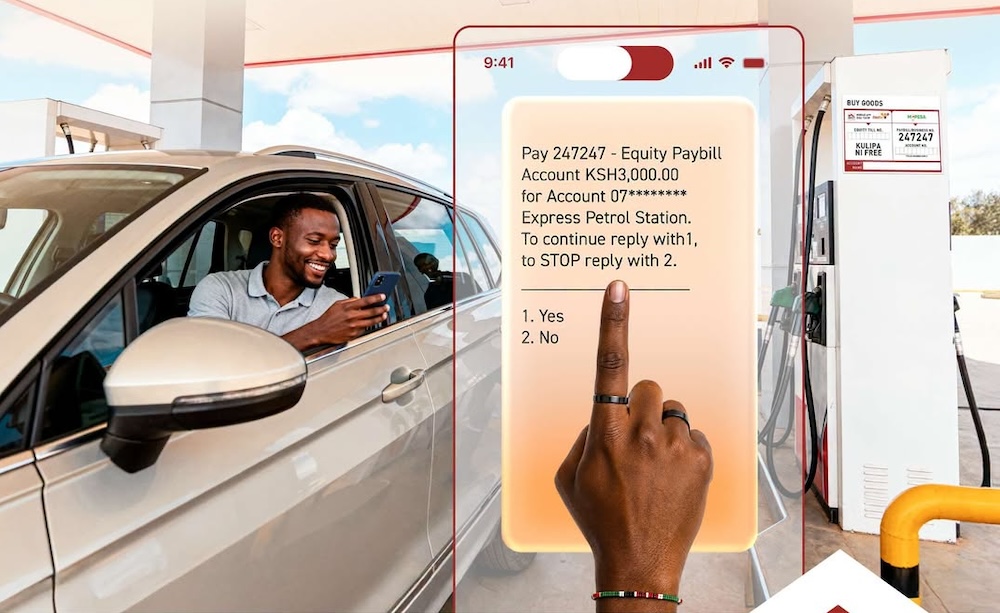
A single wrong digit in a Till or account number can send an M-PESA payment to the wrong recipient. Hakikisha adds a real-time name-confirmation step so customers can check the registered merchant or business name before confirming a payment.
The service is being extended to Equity Bank’s merchant and business payment channels, giving customers making M-PESA C2B payments to Equity-registered merchants an opportunity to verify who they are paying before the transaction is completed.
For customers, the change addresses a straightforward problem. A Till or account number may be difficult to recognise, and entering one incorrectly can result in money being sent to the wrong party. The name displayed during the payment process provides another reference point before the customer commits the transaction.
The important part of the service is the timing. The customer’s opportunity to verify the recipient comes before the payment is submitted, creating a clear checkpoint between entering the details and completing the transaction.



What is Hakikisha?
Hakikisha is a name-confirmation service offered by Safaricom for M-PESA customers. It allows users to verify the recipient’s name before completing a transaction.
For Equity’s merchant and business payment channels, the capability is being extended to M-PESA C2B payments involving Equity-registered merchants. When a customer initiates a payment, the registered name of the merchant or business is presented before payment confirmation.
That gives the customer a simple question to answer: does the name on the screen match the business they intend to pay?
If it does, the customer can proceed. If it does not, the transaction can be cancelled and the payment details checked again.
How Hakikisha works when paying an Equity merchant
The process takes place within the M-PESA payment journey.
To make an M-PESA C2B payment to an Equity merchant, the customer selects Lipa na M-PESA, followed by Pay Bill. The customer then enters Equity Bank’s PayBill number, 247247, followed by the relevant merchant account or Till number.
Once the payment details have been entered, the merchant’s registered name appears on the customer’s screen.
This is where Hakikisha provides its value. The customer can take a moment to confirm that the displayed name belongs to the merchant or business they intended to pay.
If the details are correct, the customer selects Confirm to proceed. If the displayed name does not match the intended recipient, the customer should select Cancel and verify the correct account or Till details with the merchant.
The name validation happens in real time, with minimal delay to the payment journey.
Why seeing the recipient’s name matters
For many digital payments, the customer starts with a number.
A Till number or account number identifies where money should be sent, but it does not necessarily tell the customer whether they have entered the details belonging to the business they intend to pay.
That becomes a problem when a customer makes a simple input error. Incorrect account numbers or Till numbers entered at the point of payment are a common source of misdirected C2B transactions. These can lead to reversal requests, customer frustration and additional handling.
Hakikisha introduces recipient identification into that process.
Instead of asking customers to rely entirely on the payment details they entered, the service gives them the registered name associated with those details before the payment is confirmed.
A mismatch can therefore become a reason to stop and check.
A name can provide a useful checkpoint
Consider a customer paying a shop, service provider or other business through M-PESA.
The merchant provides a Till number. The customer enters the number and proceeds with the payment. If a digit has been entered incorrectly, the resulting recipient may not be the intended business.
With Hakikisha, the registered name displayed before confirmation gives the customer another opportunity to spot that problem.
If the displayed name belongs to the intended merchant, the customer can continue with the transaction. If the name is unfamiliar or clearly belongs to another business, the customer can cancel and confirm the correct payment details with the merchant.
The process does not require the customer to manually research the recipient. The relevant name is presented as part of the payment journey.
What customers should do when the name appears
The usefulness of Hakikisha depends on customers paying attention to the confirmation screen.
After entering the Equity PayBill number and merchant account or Till details, customers should check the registered name displayed before confirming the payment.
If the name matches the business they intend to pay, they can proceed with the transaction.
If it does not match, customers should cancel the transaction and verify the correct account or Till details with the merchant.
That makes the name confirmation more than a piece of information on the screen. It gives the customer a specific decision to make before the money moves.
What happens when the name does not match?
A name mismatch should be treated as a reason to pause.
Customers should cancel the payment rather than proceeding with an unfamiliar recipient. They can then confirm the correct Till or account details with the merchant and initiate the payment again.
This is particularly relevant where customers manually enter payment details. A single incorrect digit can change the destination, while the registered name can make that error visible before confirmation.
For merchants, the same process can help reduce the number of payments that become disputes or reversal requests because of incorrect payment details.
What Hakikisha means for Equity merchants
The feature is intended for M-PESA users transacting with Equity-registered merchants through C2B payment flows, while merchants and businesses registered on the Equity platform also stand to benefit from fewer payment errors and related queries.
For a merchant, having the registered business name appear before confirmation gives customers an additional reference when making payments.
For customers, it provides greater clarity about the recipient associated with the payment details they have entered.
That connection matters because the customer and merchant are looking at the same transaction from different sides. The customer wants confidence that the money is going to the intended business, while the merchant has an interest in receiving payments correctly and avoiding unnecessary disputes.
Making recipient verification part of the payment
Hakikisha is built around a simple point in the payment journey: verify the recipient before confirming the transaction.
The service does not require customers to change how they use M-PESA. The name check appears after the payment details have been entered and before the transaction is confirmed.
For Equity’s M-PESA C2B payments through PayBill 247247, that means customers can see the registered merchant or business name and decide whether it matches the recipient they intended to pay.
For customers, the practical habit is straightforward: enter the payment details, check the name displayed, then decide whether to confirm or cancel.
Before you confirm, check the name.
Go to TECHTRENDSKE.co.ke for more tech and business news from the African continent and across the world.
Follow us on WhatsApp, Telegram, Twitter, and Facebook, or subscribe to our weekly newsletter to ensure you don’t miss out on any future updates. Send tips to info@techtrendsmedia.co.ke

