
Samsung’s Galaxy S26 Ultra Points to a Future Where AI Features Handle the Small Stuff
Across the latest flagship devices, assistants are being trained to move through apps, read conversations and assemble tasks in ways that start to resemble delegation

The modern smartphone has sort of reached a plateau. Hardware improvements are incremental, minus the jolt they once carried. Cameras will probably get brighter sensors, with displays getting minor adjustments. Processors get faster in measurable but often invisible ways.

However, something else is happening under the slab.
With the launch of the Samsung Galaxy S26 series at Galaxy Unpacked last night[Official Kenyan Prices here], it was clear that the centre of teh gravity has shifted from hardware to software cognition. The demos from last night showed how the smartphone now spends far more time interpreting intent than responding to taps. Samsung showcased how the S26 Ultra watches patterns, anticipates small tasks, and occasionally takes action before the user asks.
What is emerging around the new S26 Ultra is something visible across the smartphone industry as assistants are now no longer positioned as conversational tools, with the ambition being pointed to delegation.
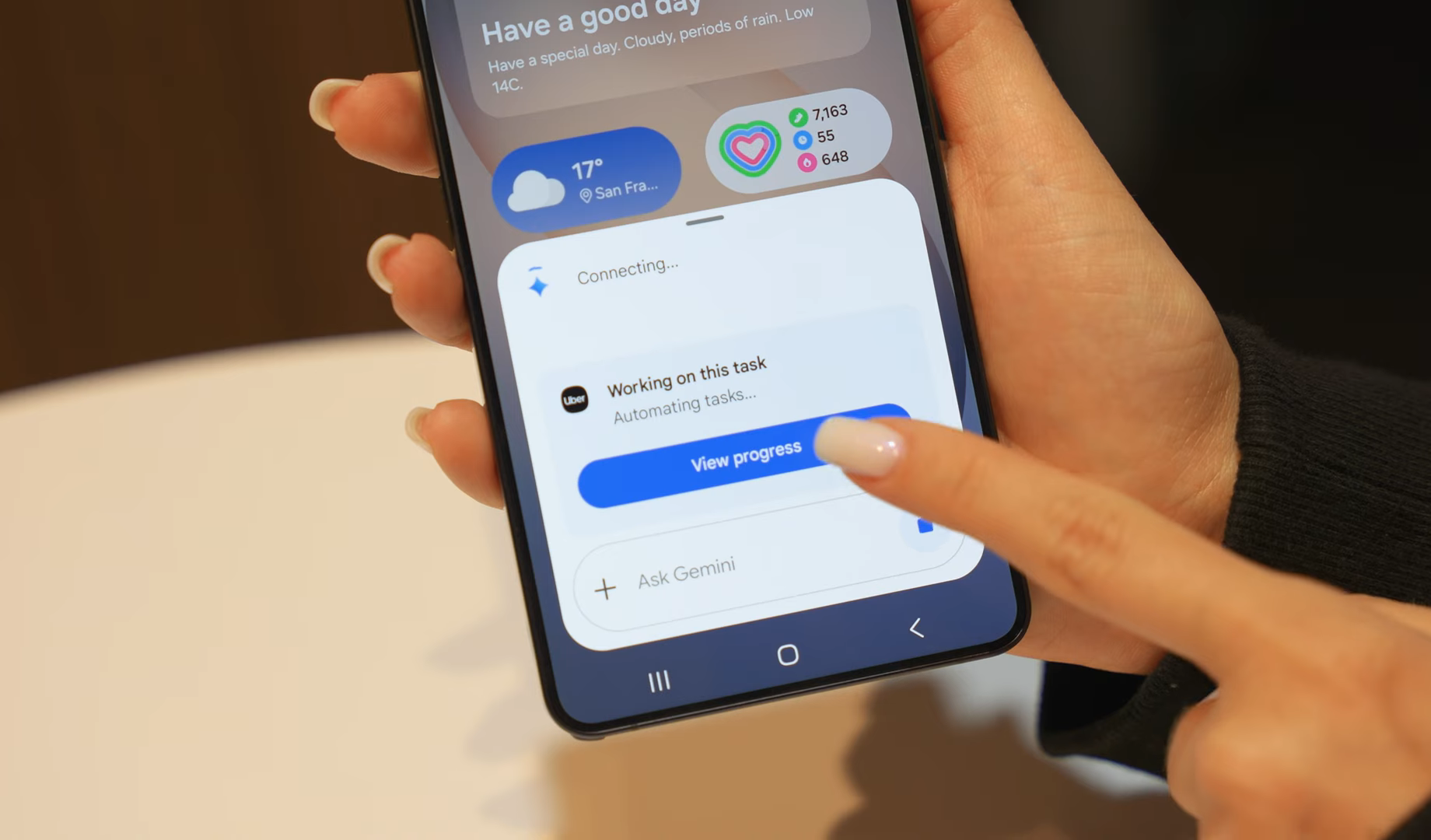
Google Gemini has now been designed to interpret context across apps, mesages and documents before carrying out tasks on a user’s behalf. This includes ordering a ride, assembling a delivery order, and pulling information from several conversations.
Samsung’s latest flagship smartphones provide one of the clearest windows into this shift. At Unpacked, the company talked about the cameras, the chips, and the displays as seen on normal smartphone launches. But the deeper story was the software, as a lot of the capabilities demoed had little to do with hardware at all. The software features are designed to revolve around AI to observe context and intervene when they believe the device understands what you’re trying to do. What was showcased yesternight felt like an experiment in whata smartphone might become when software starts taking initiative.

Now Nudges
Now Nudges were the most revealing additions by Samsung, and the idea is simple, as they are a collection of contextual prompts which work by looking at activity across messages, photos, and apps, and propose actions when it thinks it recognizes a pattern.
For example, when someone texts asking for photos from the weekend, the phone may surface the image taken with that person. When someone mentions a location in a conversation, you will get navigation suggestions.
To be fair, these are not entirely new in isolation, as devices have been dabbling in contextual hints for years, but the difference now is the growing ambition behind those hints. So instead of getting occasional reminders, the software attempts to build a running interpretation of what’s happening across the devices. The goal as seen from the event is not to anticipate instead of reacting,
All this definitely depends on on-device processing, which has been made possible by the Snapdragon 8 Elite Gen 5 processor inside the S26 Ultra. Samsung said the chip delivers a 39% improvement in AI perfomance alonhside 24% for gaming workloads and 19% for general tasks. That’s how much processing power modern smartphones now dedicate to interpeting behavioyr instaed of simply executing commands.
Audio Eraser
The Audio Eraser feature is one of the most tangible applications which appears in video playback. This feature allows the phone to separate elements within a soundtrack after the recording has already been made.
It works by analysing audio layers, identifying voices, ambient noise and background sounds. Users can then suppress or emphasise individual components. For example, a crowded street recording can be adjusted so dialogue becomes clearer, and wind noises fade away.
This feature relies on machine learning models, which have been trained to identify sound categories, and it changes how recordings are treated. Instead of accepting whatever conditions existed at the moment of recording, the phone treats sound as something editable.
This feature is a small example of a broader pattern emerging across smartphone software, with AI increasingly treating media as a flexible material.
Generative Editing
Photo editing also gets similar treatment. In the past, editing tools focused on filters, colour adjustments, saturation and colouring and cropping. The new way of editing now interprets written instructions.
When you open the gallery app on the S26 Ultra, you can now describe a change using text, such as adding a flower behind the subject, adjusting the sky or removing a person from the background.
The software interprets the prompt and generates the necessary image content to complete the request. It’s worth saying that the results will vary.
What is clear is that creativity inside smartphones is now more like collaboration instead of direct manipulation of pixels.
Creative Studio
Samsung extends this similar path to the S Pen environment, too, with the Creative Studio feature. It allows you to generate wallpapers, invitations or stickers by describing them in text. You simply type a description, and the system produces artwork.
If you prefer a starting point, Samsung provides templates, but the emphasis is on generative creation with the smartphone acting both as a tool and a designer and producing graphics that have in the past required separate applications or desktop software.
While others will treat these capabilities as novelties, the steady integration of geberative systems into everyday tools suggests a longer-term ambition. All in all, creative functions are now being redefined as conversations between user intent and machine interpretation.
Document Scanner
The document scanner inside the camera app gets upgraded as it can now go beyond capturing a flat image, the system goes ahead and analyses the document and repairs common issues automatically by removing stains, shadows and straightening distortions.
This feature stays in line in attempting to understand what the user intended to capture, not simply what the camera recorded.
Automated Call Screening
The Samsung Galaxy S26 Ultra gets an automated call screening tool which responds to unknown numbers and unsolicited phone calls on behalf of the user.
When this feature is enabled, the system answers the call and asks the caller to explain the reason for calling, and that response is transcribed andpresented on screen. After this, you can decide whether to continue the conversations.
This feature is available on other msartphons but it being on the S26 series underscores a broader pattern where AI sits between people and the outside world filterig interactions before they get to you, making the phone act as a gatekeeper.
Circle to Search
Samsung also expanded visual recognition on the S26 series thanks to Circle to Search, which was introduced on the S24 Ultra. You simply circle an object in an image, and the phone identifies the item, including doing things like estimating price andsuggesting related products. It feels simple but works through a complex network of imagerecognition and web indexing.
This feature turns the display into a searchable surface so that, instead of typing queries into the search field, you interact with what you directly see.
Automation
Automation was the biggest showcase of the AI features shipping with the S26 series. The phones get to perform certain tasks inside apps after receiving a single instruction. You can request a ride, order food or schedule a service.
This automation connects with the broader effort across the Android ecosystem, where Gemini is learning to operate apps directly instead of relying on traditional integrations. Samsung demoed how the assistant can open an app in a virtual window and proceed through the interface step by step selcting options and completing forms while pausing only when human confirmation is required.
The assistant now starts behaving like a person moving through the screen instead of it being a search tool.
Samsung and Google said that this capability is rolling out to select applications and regions for now, but this approach hints at a substantial change inhow mobile software will function, with the user describing the outcome while the device handles the intermediary steps.
The Strange Future of Personal Devices
Such developments raise broader questions about the role smartphones play in daily life. Devices once designed primarily for communication now interpret context, filter calls, rewrite audio, generate artwork, and assemble orders inside apps.
Convenience increases. Complexity rises alongside it.
This approach also introduces tension within the app economy. If assistants complete interactions on behalf of users, the interface carefully designed by developers becomes secondary. A ride-hailing service might prefer that customers browse promotions or consider subscription plans before confirming a trip. An automated assistant could bypass those moments entirely.
The benefit for users is obvious. The long-term balance between platforms, developers, and intelligent assistants remains unsettled.
For now the Samsung Galaxy S26 Ultra AI features serve as a glimpse of where personal devices may be heading. Smartphones once waited patiently for instructions. Increasingly they appear willing to take the initiative themselves.
Go to TECHTRENDSKE.co.ke for more tech and business news from the African continent and across the world.
Follow us on WhatsApp, Telegram, Twitter, and Facebook, or subscribe to our weekly newsletter to ensure you don’t miss out on any future updates. Send tips to editorial@techtrendsmedia.co.ke


