
iOS 26 Features in Depth: New UI, Enhanced Battery, and Little Tweaks That Change Daily Use
Liquid Glass may divide opinion, but the mix of design flair and functional upgrades is hard to ignore

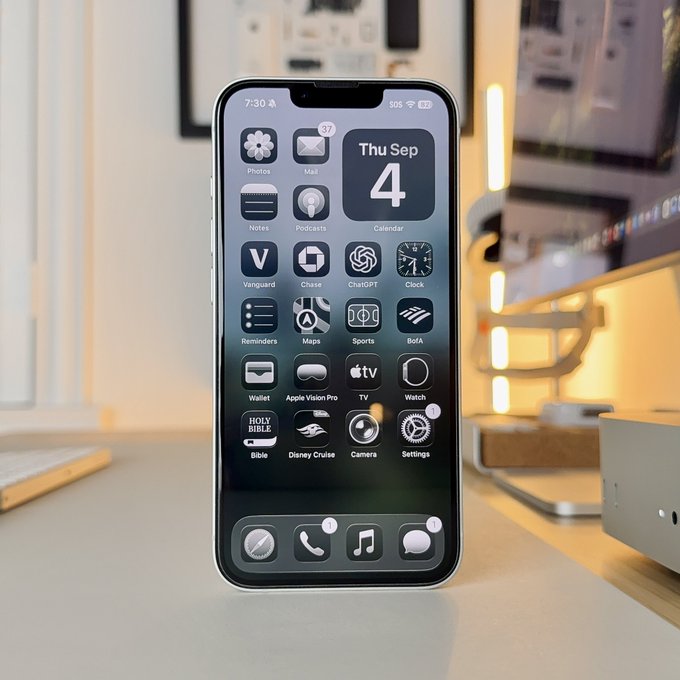
It’s been a long three months since Apple unveiled iOS 26 at its Worldwide Developers Conference in June. The wait is finally over — the free update is now available to download on compatible iPhones.

And it’s not only iPhone owners who get something new today. Samsung has started rolling out its One UI 8 update, debuting on the Galaxy S25 Series this week. The Galaxy S24 line (including the S24 FE), Z Fold6 and Flip6, plus other recent models, are set to follow later this year.
A New Look: Liquid Glass
Apple’s headline act is Liquid Glass, a design language that reshapes the iPhone’s interface. It’s translucent, reactive, and layered, with refractions that shift as you swipe. Widgets, toggles, icons — everything takes on the sense of depth.
But not everyone is a fan. With bright backgrounds, translucent toolbars can blur into unreadable text. If the look feels too much, you can tame it: head to Settings > Accessibility > Display & Text > Reduce Transparency. That strips out most of the glassiness. For a middle ground, “Increase Contrast” makes elements easier to spot without ditching the style entirely.
Smarter Systems at Work
Beneath the shimmer, iOS 26 adds practical intelligence where it matters. The new call-screening assistant answers unknown numbers on your behalf, asks the caller to identify themselves, and transcribes what they say so you can decide if it’s worth picking up. Pair that with Hold Assist, which waits on hold so you don’t have to, and suddenly your iPhone feels like a true buffer between you and the chaos of modern calls.
Messages picks up long-requested group typing indicators, the ability to run polls (“What’s for dinner?” is now officially a feature), and custom chat backgrounds. The backgrounds are global to each thread, which means one friend’s bad taste in wallpaper can quickly spark a background-changing war.

Live translation also debuts in calls and Messages, although the feature requires newer hardware — an iPhone 15 Pro or later. Right now, it supports English, Spanish, German, Portuguese, and French.
Apps Reimagined
Apple has reworked its core apps. The Phone app shifts its search bar to the bottom (divisive already), though you can opt back into a Classic view if you prefer the old layout. The Camera app simplifies controls but hides deeper settings in a swipe-up “secret menu,” which takes some re-learning. A Lens Cleaning Hint now nudges you when smudges might be ruining shots.
Photos restores Library and Collections tabs, undoing an unpopular experiment, while Music adds Automix — an AI-powered way to blend songs smoothly. Even screenshots get smarter: you can now search or circle an item within the capture, echoing Google’s “Circle to Search.”
Battery, Snooze, and Small Surprises
Battery tracking is more transparent than ever, showing background drain, notifications, and usage trends. Adaptive Power Mode adjusts performance on high-demand days, trimming little things to stretch runtime.
Other welcome quality-of-life tweaks include adjustable alarm snooze times (though capped at 15 minutes), the ability to turn AirPods into camera shutters, easier filtering for spam texts, and even setting voice memos as ringtones. They’re small, but they add texture to the daily iPhone routine.
Compatibility and Trade-Offs
The update supports iPhone 11 and newer. Owners of the iPhone XR, XS, and XS Max won’t make the cut this time. And while all supported devices will see the redesign, some effects — especially the heaviest glass and spatial visuals — will run best on the iPhone 15 and 16 series.
Zoom Out
With iOS 26, Apple isn’t just polishing the iPhone — it’s redefining how it feels. Liquid Glass may divide opinion, but the mix of design flourishes and functional upgrades makes this one of the most significant iOS releases in years. From call-screening and hold assist to subtle translation and smarter battery tools, the update weaves usefulness into everyday life. While Samsung’s One UI 8 rollout broadens the week’s headlines, iOS 26 remains the story — a release that will shape how millions experience their iPhones for years to come.
Top 10 iOS 26 Tips
- Screen Unknown Calls – Let the new call-screening assistant answer unknown numbers and transcribe their message.
- Hold Assist – Skip waiting on hold; iOS 26 handles it for you.
- Tame Liquid Glass – Reduce transparency or increase contrast under Settings > Accessibility > Display & Text for clearer visuals.
- Group Typing Indicators – See who’s typing in Messages threads for smoother conversations.
- Run Polls in Messages – Ask “What’s for dinner?” or any other group question without leaving chat.
- Custom Thread Backgrounds – Personalize your chats, but watch for wallpaper wars.
- Live Translation in Calls – Supports English, Spanish, German, Portuguese, and French on iPhone 15 Pro and later.
- Adaptive Power Mode – Optimizes performance for high-demand days, extending battery life subtly.
- Library & Collections in Photos – Reintroduced for easier photo organization.
- Smart Screenshot Tools – Search, circle, and interact with items directly in screenshots.
Go to TECHTRENDSKE.co.ke for more tech and business news from the African continent.
Mark your calendars! The TechTrends Pulse is back in Nairobi this October. Join innovators, business leaders, policymakers & tech partners for a half-day forum as we explore how AI is transforming industries, driving digital inclusion, and shaping the future of work in Kenya. Limited slots – Register now – here.
Follow us on WhatsApp, Telegram, Twitter, and Facebook, or subscribe to our weekly newsletter to ensure you don’t miss out on any future updates. Send tips to editorial@techtrendsmedia.co.ke
TechTrends Media Podcasts


