Behind Apple Intelligence Lies a Question About Whether Technology Can Truly Learn the Human Routine
Apple Intelligence opens a quieter frontier in computing, where the company starts teaching its machines to notice the pauses, patterns, and half-finished gestures that define how people really use technology


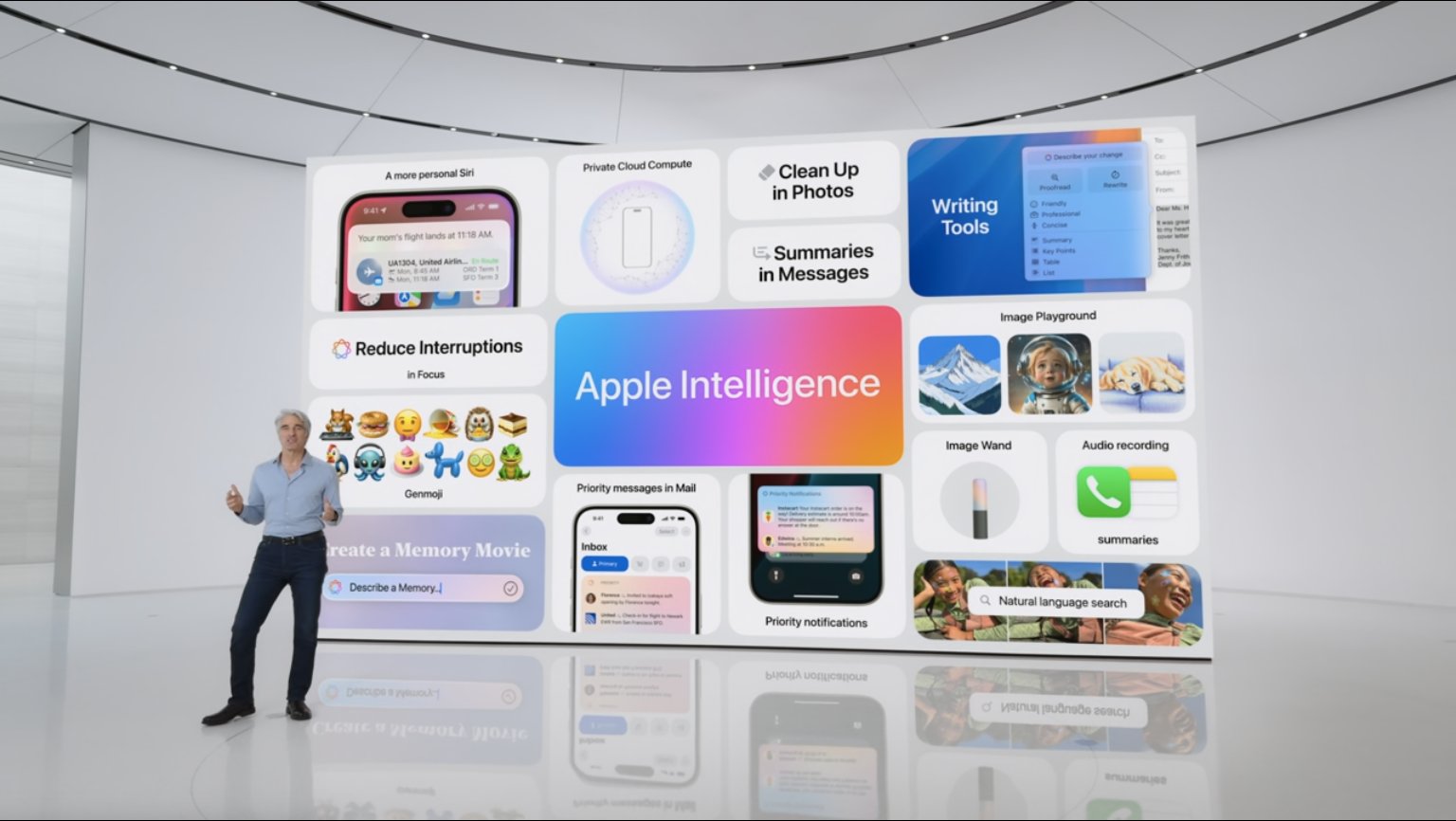
Apple Intelligence is no longer a promise. It is arriving in people’s pockets and workflows in small, useful bursts. Not theatrical reveals. Not headline grabs. Features that tidy a notification list, summarize a long email and remove a stray object in a picture are already changing day-to-day use. You can even summon Siri without speaking. These touches alter routines and nudge how attention moves; they also change how commerce and personal data interact.

This is not reckless invention. It is careful product work. Each feature is calibrated to feel like a helpful fix, not a new platform to learn. That makes adoption smoother. It also masks the deeper questions that follow.
Where intelligence hides inside the ordinary
You notice it most in the background. Notifications no longer tumble in without order. The system now learns which messages carry urgency and quietly brings them forward. Weather alerts, emails that demand quick replies, even a text from a recurring contact — they appear first, not because you asked, but because the machine has been watching how you respond.
It’s easy to miss what that means. For years, Apple’s software was designed around intention. You tapped, you scrolled, you opened. Now, with these Apple Intelligence features, the interaction feels more like collaboration. The software interprets you. It studies the rhythm of your daily use, guessing what belongs at the front of your attention.
Summaries that reveal how machines now edit time
Another quiet innovation sits in the summaries. Long messages in Mail, long pages in Safari, and long threads in Messages now arrive with brief, self-generated outlines. The machine trims the narrative before you reach it. Some are blunt. Others, unexpectedly funny. What they share is a new kind of editorial function: Apple’s algorithms acting like an assistant that decides what you probably have time to read.
That sounds harmless until you realize what’s changing underneath. The feature doesn’t just shorten text — it compresses time. Every summary replaces a moment you might have spent forming your own conclusion. In practice, that’s efficient. Philosophically, it’s something else entirely.
Siri’s new voice feels less like a command and more like a negotiation
Siri now lives differently too. The glowing edge of the screen and the more forgiving rhythm of conversation make it less brittle, less eager to fail. It understands hesitation better. You can trip over your words and it still waits. Apple has taught it patience — a small but meaningful evolution in how people speak to software.
The new Tap to Siri shortcut makes the interaction quieter, though not in a literal sense. You can double-tap the bottom of the screen and type your request instead of speaking aloud. It restores a kind of privacy to digital interaction. For anyone surrounded by other Apple devices, it’s also a relief: fewer accidental responses from nearby machines.
There’s something telling about that. Apple is leaning into control without calling it that. It’s redesigning the idea of interaction itself — less performance, more precision.
A company that now measures attention instead of clicks
Apple’s focus has turned toward the unnoticed parts of daily use. With the Reduce Interruptions Focus mode, the system no longer simply blocks everything; it filters, choosing what might still deserve a moment of your attention. Bank alerts slip through. Weather warnings make it past the wall. What once was a binary switch between noise and silence has become a flexible, almost interpretive filter.
These Apple Intelligence features show where the company’s design philosophy is heading. It’s not about spectacle or novelty anymore. It’s about shaping how people divide their concentration, quietly influencing what gets through.
Machines that clean the frame, and what that reveals about Apple’s intent
Even the new Clean Up tool in Photos carries this thread. You can brush away objects, cables, litter, and other intrusions. The algorithm fills the gaps convincingly enough. On the surface, it’s a convenience. Underneath, it’s a statement: Apple wants its devices to tidy the world as they record it, to make a scene more like how you wished it looked.
It’s not hard to see where that instinct leads. The tools are practical now, but they hint at a design culture that treats human perception as something editable. Every generation of Apple software moves a little further toward interpretation over presentation. You’re no longer seeing the raw moment. You’re seeing the version Apple thinks you meant to capture.
The larger question Apple Intelligence raises
Taken together, these updates form a subtle but coherent pattern. Apple is shifting from a company that engineered responses to one that predicts them. The difference is philosophical, not technical. Prediction demands trust — not only in the accuracy of the machine, but in its intentions.
For now, Apple Intelligence lives in small gestures: the reordered notification, the truncated email, the cleaner photograph. Yet those gestures mark a turning point in what personal technology means. The tools no longer wait for instruction. They observe, they infer, and they begin to decide what matters most to you — often before you do.
That’s the quiet transformation under way. The company isn’t selling smarter devices; it’s building devices that study you well enough to seem considerate. Whether that feels like progress or intrusion depends on what kind of intelligence you think your tools should have.
Go to TECHTRENDSKE.co.ke for more tech and business news from the African continent.
Follow us on WhatsApp, Telegram, Twitter, and Facebook, or subscribe to our weekly newsletter to ensure you don’t miss out on any future updates. Send tips to editorial@techtrendsmedia.co.ke

