The Apple Watch Keeps Finding Small, Ordinary Ways to Stay Useful
How the Apple Watch moved from a wrist gadget to something that subtly measures the rhythm of ordinary life


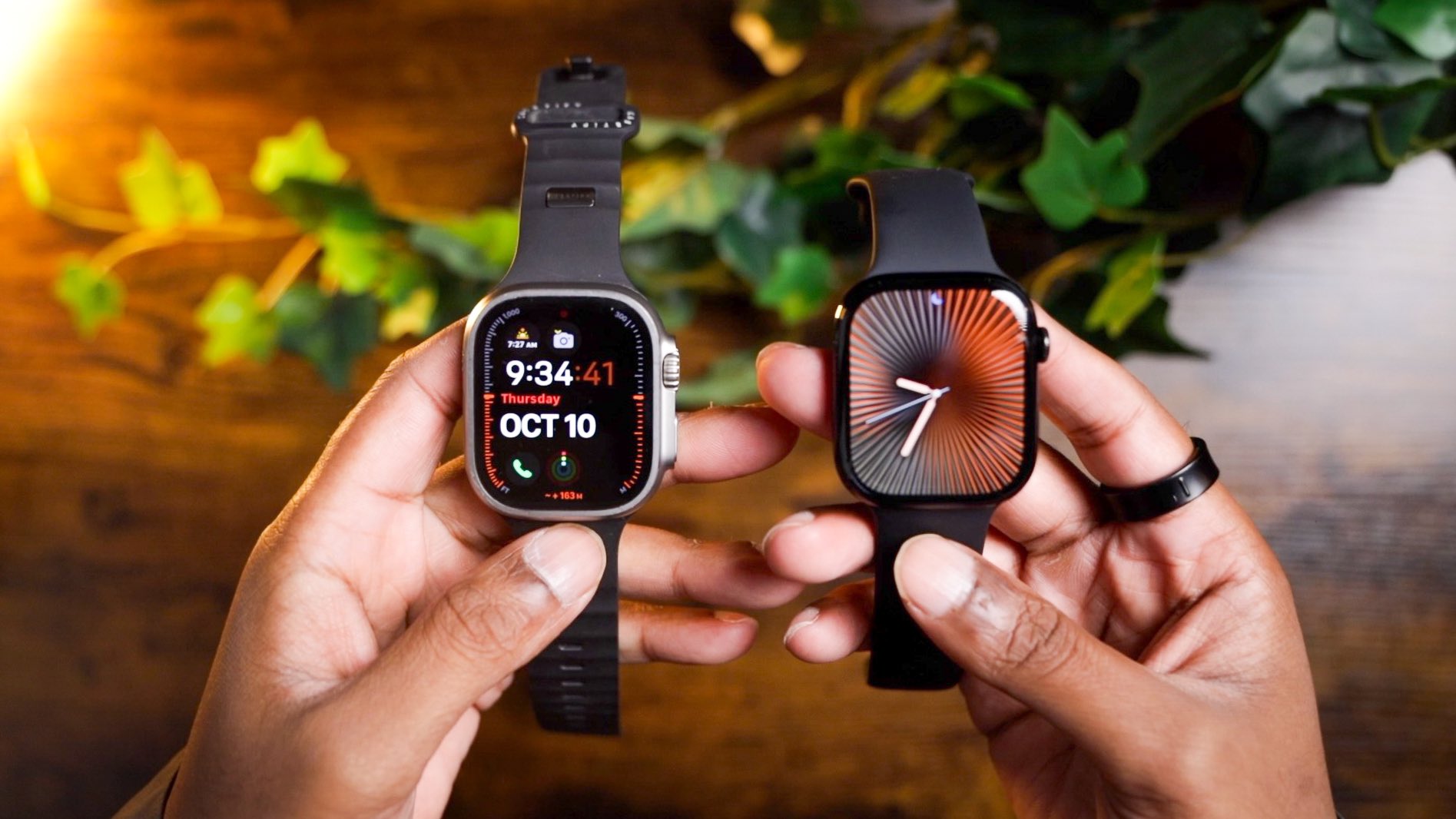
There is a moment, every year, when the latest watch arrives and the conversation splits. Some people talk specs, others talk looks. A handful treat the device as a tiny health lab on the wrist. Somewhere in the middle sits most of us, wanting the watch to be useful without demanding we relearn how to live. This feature takes the practical tips that get passed around group chats and inboxes and treats them like clues. Read them as features, yes. Read them also as evidence of how the product is evolving — unevenly, sometimes awkwardly — as tech meets real lives.
What Vitals really does, and where it stumbles
Vitals is the product’s claim that the watch can turn sleep data and overnight sensors into actionable insight. On good nights it draws a baseline for your heart rate and breathing, and flags values that stray from that baseline. That is useful. Atypical readings often prompt users to seek care they would otherwise postpone.
But there are tensions. The watch is not a doctor, nor is it designed to replace clinical testing. That distinction has blurred in user conversation, and in product copy. There is also an inconsistency across models and markets. Older watches show blood oxygen directly on the device. Some newer models collect similar data but only present it inside the phone’s health app, not on the watch face; legal wrangling over patents and approvals is one reason. The result: owners who expect parity between models discover differences only after purchase. Frustration follows.
Practically, Vitals works best when treated as a trend file. One-off anomalies are noise. Repeated changes in resting heart rate, or a sustained uptick in respiration during sleep, are the moments to act. For journalists and clinicians both, the interesting question is less whether the watch can measure and more whether users will act on subtle alerts or simply tune them out.
Smart Stack: the promise of context, and the fight for attention
Smart Stack tries to make the watch useful without cluttering the face. Turn the crown or swipe up and a set of tiles appears. The idea is to surface timely items — an order delivery, a commute update, or a quick timer — when they matter.
That design treats the small display as a stream of possibilities. It also forces a trade-off: what appears when you blink is decided by algorithms plus a few pinned tiles you choose. For people who like control, pinning a Timer or a preferred widget works. For others the stack becomes an interruption machine, popping to the fore for things they do not want right then. Live Activities ramp up that effect. If an app is actively doing something for you, the Smart Stack can become the main view instead of the watch face.
This is about attention economy on an even smaller scale. App makers want visibility. Apple wants the device to feel helpful rather than cluttered. Users want reliability and low friction. The practical tip is simple: pin the things you actually use, turn off automatic Live Activity launches if they grate, and worry less about emerging widgets you did not add. The analytic angle is more interesting: watchmakers are learning that small screens do not merely mirror big ones; they demand a new etiquette for interruption.
Gestures, Wrist Flick, and the awkward theater of motion
Wrist-based gestures are the most theatrical feature of modern wearables. A quick flick to dismiss a notification, or to jump back to the face, sounds elegant in a demonstration. In real life the movement becomes social choreography. On a commute, a flick could be read as impatience. While exercising it works well; when in a meeting it is noisier.
What matters is not the gesture itself but how reliably it works, and how often it misfires. Double Tap and Wrist Flick give people ways to interact without touching the screen. That is helpful when hands are busy. But false positives are costly. Accidentally dismissing a call, or hiding a critical timer, can feel worse than the annoyance the gestures try to avoid.
Practical approach: practice the motion so it becomes deliberate. Turn off gestures for contexts where they misbehave. And pay attention to which apps the gestures control; there is variation across updates and models.
When convenience collides with privacy and regulation
The Apple Watch sits at an awkward intersection. It is personal, worn daily. It collects health signals many people never expected to be quantified. At the same time the device exists inside a company ecosystem with its own business incentives and legal constraints.
Consider blood oxygen data again. Technical capability is one thing; regulatory clearance and intellectual property disputes are another. That fragmentation leaves users with different experiences depending on where they live and which model they own. It also raises a question: should we treat the watch as a private sensor owned by the wearer, or as part of a mediated platform that decides what to show, when, and how? The answer affects trust, and trust is a scarce commodity in health tech.
Speculative outcome: regulators will keep testing the boundary between consumer convenience and clinical grade claims. Companies will try to keep features that feel health-useful but stop short of medical claims that require costly approvals. Users who value raw data will look to companion apps or third-party devices for fuller access. The uneasy middle will grow larger.
Small design choices that tilt daily experience
A flashlight on a wrist seems like a small gimmick until you use it walking the dog at 3 AM. The screen-as-light is not bright enough to replace a phone, but it has moments of usefulness. Similarly, the ability to pause activity rings during travel or illness is a tiny mercy that changes how people keep streaks and measure wellbeing.
These are not sexy features. They are the workaday details that determine whether the watch is companion or nuisance. They also reveal product thinking: engineers are starting to accept that people want to protect streaks and reputations online without gaming health outcomes. That acceptance matters.
Business, app makers, and what to watch next
App developers are figuring out how to use Live Activities without annoying people. Apple’s choices about Smart Stack priority shape who gets visibility. That is influence. It is also a quiet platform governance question dressed as product design: what appears when a user glances at a watch has commercial value.
Watch this space for more tension between user control and platform curation. Look also for consolidation in health features. Companies that can prove clinical validity will create premium tiers. Others will focus on ambient, permissioned nudges that avoid clinical intent.
When health tech starts setting its own boundaries
Manufacturers are now weighing how much freedom the watch should have in presenting health data. Some are leaning toward tighter control — deciding which readings stay on the device and which get pushed to the phone — a move that could make the experience more predictable and easier to trust.
Others seem to prefer expanding the ecosystem instead of narrowing it. Developers are finding room to build richer dashboards and tools that make sense of the raw information. That depth comes at a cost, though, as it often fractures the experience between apps and platforms.
Regulators, meanwhile, are circling the question of where “wellness” ends and “medical” begins. The distinction may not stay voluntary for long. If new rules require consent layers or formal approval for certain readings, some features will inevitably slow down. Yet what survives that process could carry more weight — and more credibility — with users who rely on it.
In the end, the future of the watch isn’t about one path winning out. It’s about which trade-offs people are willing to live with: trust versus speed, simplicity versus control, consistency versus freedom to experiment.
How to apply the tips without fuss
If you want useful takeaways, try this: use Vitals to watch trends, not headlines. Tame the Smart Stack by pinning what you use and turning off auto Live Activities you dislike. Learn the gestures in private until they feel intentional. Pause activity rings when life requires it. Small adjustments deliver the highest day-to-day value.
Final read: what the watch reveals about tech
The Apple Watch is more than a product. It is a lens on how hardware and software trade off convenience, attention, privacy, and regulation. The practical tips help you today. The deeper lesson is that wearables are maturing into devices that must balance measurement with meaningfulness. That is not an engineering problem alone; it is a cultural one. Watchmakers are learning that usefulness arrives slowly, in small details and user compromises. Keep an eye on those details. They will tell you more than the spec sheet ever could.
Go to TECHTRENDSKE.co.ke for more tech and business news from the African continent.
Mark your calendars! The GreenShift Sustainability Forum is back in Nairobi this November. Join innovators, policymakers & sustainability leaders for a breakfast forum as we explore sustainable solutions shaping the continent’s future. Limited slots – Register now – here. Email info@techtrendsmedia.co.ke for partnership requests.
Follow us on WhatsApp, Telegram, Twitter, and Facebook, or subscribe to our weekly newsletter to ensure you don’t miss out on any future updates. Send tips to editorial@techtrendsmedia.co.ke
TechTrends Media Podcasts

